So it’s been a while since my last entry. This one has been laying around near-finished for around four months now and I figured it was about time to clean it up and publish it, so let’s pick up where we left off:
Optimizations are required. We’re barely at a stable 60 fps in a test scene where the most exciting thing that is happening is a few particle effects and a character waving to the camera. So where do we start? Is it the shadowrendering? The collision system? I’m not much for guessing games so I’ll be using PIX to profile what is eating up frametime and we’ll begin at the greatest offender and work our way down.

Render assembler
Previously when a frame was rendered the Renderer would look for each renderable component by looping through all game objects and rendering that component, which resulted in looping through all game objects multiple times, and often switching PSOs. I decided to rewrite this to go through all game objects only once and adding each renderable component to a corresponding list (Forward rendered meshes, deferred rendered meshes, particles, etc.) that it then commits to render commands once the lists have been populated.
It’s a relatively minor improvement that could be enhanced by sorting the lists based on PSO used to further reduce the amount of state switches in the graphics engine. A future plan I have is to rework the component system to be pooled, which means that the Render Assembler would be able to just grab all the components directly instead of having to look through each game object.
It also turns out that a lot of frametime is going to clearing a chunk of data in the graphics command list that is just being overwritten anyway. Removing this line of code improved the average frametime by a whopping 2.37ms!

All in all the changes in the Render Assembler resulted in the frametime in my test scene dropping from 16.9ms to 9ms (An increase of over 70 fps).

Static & Dynamic shadows
A big spender of frametime are shadows, since all shadow-casting lights have to render the scene from their own perspective to create usable shadowmaps. However if a light stays still shining on a non-moving object, there is no need to render this more than once! That’s why I decided to split up the shadowmap of all lights into two: a static shadowmap and a dynamic shadowmap. Now this results in more memory being used but it’s often a worthwhile sacrifice to ensure better performance.
The way this works is that all lights and all renderable components have a flag that says that they are static or dynamic. Any static light will render all static objects to its static shadowmap once, and then only update its dynamic shadowmap with dynamic objects, whereas a dynamic light will continuously update both its shadowmaps.
One problem now though is that if a light or an object has been marked as static and then begins moving it results in some very strange visuals. I’ve been trying to figure out a sensible way to avoid this, by either never letting a static object move, or to mark static objects that start moving as dynamic and rerender all static shadowmaps (or atleast the ones who could have been affecting the moved object), both of which have some pretty annoying downsides.


Improved culling
One of the best ways to reduce rendering costs is of course to not render something at all!
I’ve realized during my work with the engine that my shape intersection code has been a bit sloppy, so I finally sat down and fixed it. In some instances meshes would either be culled incorrectly or not at all even though they didn’t appear on screen, which usually had to do with them being scaled. With updated and optimized intersections this problem has now disappeared.
While lights have for a long time culled what they render for their shadowmaps based on their frustum/radius (depending on whether it’s a directional light/spotlight or a point light), nothing actually stopped them from being rendered in the first place. Now they are culled based on whether their frustum/radius is inside the camera frustum, completely skipping lights that don’t affect anything on screen.
Particle- and trailsystems now also have dynamic bounding boxes to allow them to be culled. It’s a bit hard to measure the performance increase since it depends on where you are looking, but you can see an instant jump in fps once they go out of frame.
Animated models
When animating for games the animations are often created in 30 or 60 frames per second, which means that unless you’re interpolating the animation frames (which most engines seem to do) each animation frame will last more than one rendered frame (Assuming that the game is running higher than whatever the fps of the animation is). Right now the engine updates each animated mesh’s pose every single frame, so if you’re running it at 90 fps and viewing a 30 fps animation, that animation is calculating each frame-pose three times! Going through the joint hierarchy of a skeletal mesh and performing calculations is relatively costly so if we can avoid doing it we will.
It’s a pretty simple fix to make it so that the model only updates its pose whenever it goes to a new animation-frame. What creates a bit of a problem is that the engine supports animation layers with blending. This means that we have to check each animation layer and if ANY of them have moved to a new animation frame then we must update the animation pose. Another bonus of this change is that it allows us to adjust how often an animation should update its pose if we for example want to lower the framerate when a skeletal mesh is a certain distance from the camera to save processing power.
Maybe some day I will rewrite my math library to use SIMD for faster matrix multiplications (Or more reasonably, switch over to some math-library), but that day is not today.
Debug passes
All the changes in these last two devlog-entries resulted in my debug passes not working anymore, so I went ahead and changed those too, merging 14 different shaders into just two. One for anything that can be rendered with data from the GBuffer (Albedo colors, pixel normal, and such) and one for forward rendered objects (Vertex Colors, vertex normal, etc).
The new shaders use branching based on what debug rendering pass is currently selected, but this shouldn’t be too much of an issue as the wavefronts should all be executing the same branch. Regardless, performance isn’t the important thing here.
THE RESULTS
This venture ended up a lot more fruitful than I had anticipated. The engine went from rendering the test scene at just about 60 fps to 155 fps!

I thought it would be interesting to make a graph over the frametime and fps after each optimization, so I’ll share it here too:
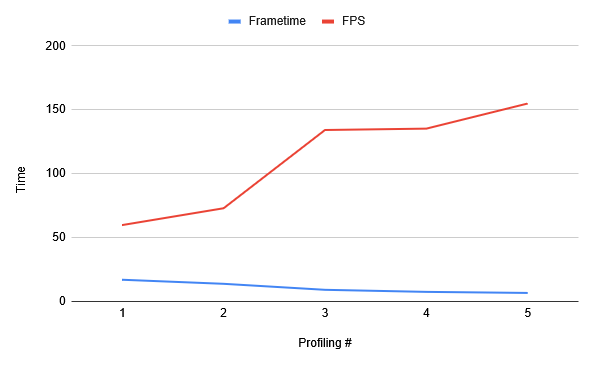
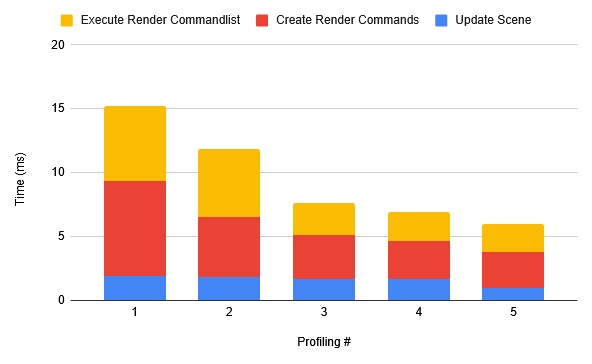
- The initial profiling
- After refactoring the Render Assembler
- Static & Dynamic Shadows
- Culling improvements
- Animation Updating